2k Expansion Block Delivered to Backers

Expansion Block
Expansion Block

The 2k Expansion Block has been delivered to backers of the Mega fundraiser from a couple months ago — check your inboxes if I haven’t already caught you online.

The block increases the maximum number of objects of a region from 1,000 blocks to 2,000 blocks.  I didn’t want to release this previously due to performance concerns, but after the recent performance improvements, I’m looking forward to seeing how the engine handles such demands.  If it performs well, then this might be available in the store one day.


PS – Tarkus, if you’re reading this, I don’t have an e-mail for you, so please get in touch and I’ll trade the blocks to your account. 🙂

Laser Turrets!

You can now build Laser Turrets!

The laser turret is tied into the current town PVP setting, and may fire at players when they approach:

  • /townpvp off – Defensive mode, turrets will fire at non-citizens
  • /townpvp on – PVP mode, turrets fire at everyone
  • /townpvp bounty – PVP mode, turrets fire at everyone
  • /townpvp dungeon – turrets fire at everyone
  • /townpvp safe – (NEW) Safe mode, turrets fire at no one
  • Wilderness – turrets fire at everyone

Depending on town mode, the turret may take damage if a player attacks it.  If so, the turret will go offline for a while before reinitializing. (The turret does not get destroyed by damage, only temporarily disabled).

Laser Turrets are available to Level 5 players for 5 plat in Shop > Traps.

Better Inventory & bug fixes

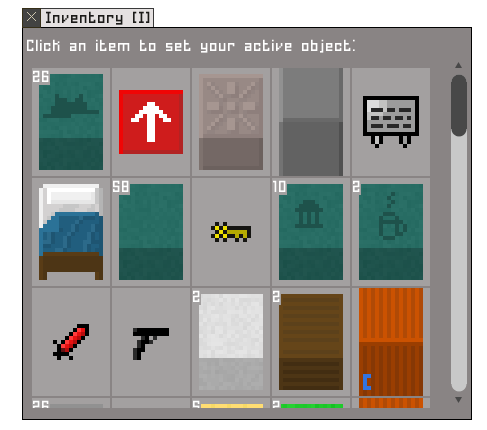
I’ve improved the inventory screen a bit, so as to not have the overlapping issues that the old screen frequently had.  Also, screen wheel support (finally!)

inventory

  • When placing a block, the preview block no longer blocks your movement or gets you stuck
  • When placing a block, the preview block no longer displays if your cursor is out of the world
  • Fixed bug where inventory items could be selected even if they weren’t visible due to scrolling
  • Fixed bug where accept trade button was hard to click if there were multiple rows of inventory items being traded
  • Inventory items are now clipped to a maximum amount to prevent overlap
  • Easier to read quantity labels, including when dragging over to trade window (is offset slightly so still readable next to cursor)
  • Scroll wheel support on inventory window
  • Tooltips use proper font
  • Fixed bug where pickup item would disappear after finishing trade
  • Possible fix for Meep server crash + more debug info

Building Update

A couple updates today:

1) I’ve ported over the ObjectID change from Potato.  This is a pretty big change under the hood, so please report here any new bugs that arise from it.  Fortunately, it looks like it was pretty stable when running on Potato for the past few days.

bigRedCursor2) Reworked the build system.  Building is a littler faster and a bit more intuitive now.  To build stuff, just open the inventory and click the item.  If it’s a weapon, it’ll equip it per usual.  If it’s a construction block, you will immediately be able to place it.  Want to drop a weapon?  Just click ‘drop’ on the active item panel.  Finally you can drop white swords again 😉  Pickup mode is similarly easy — there’s a new Pickup Item object in your inventory (it does NOT count towards your inventory limit).  Click it and you’ll be in pickup mode.  All the old Q, R, CTRL+[, CTRL+], etc hotkeys still work.

Draco’s text has been updated to correspond with the client changes.

3) You have a little pixel cursor for your mouse image now.  This is useful because it ties into the build system and changes color depending on if you’re in normal, pickup, or drop modes.

4) Buy gold screen has been improved, with an explanation on how to get gold & plat, and a link to the trading forum if you’d rather not buy plat, plus thank you text at the bottom right for those who do.

5) Tooltips on several objects explaining how to use them, including all weapons and the Pickup Item.

6) Using new style buttons in the item shop, instead of ancient grey ones

Testing on Potato

I’ve got a fairly substantial change deployed on Potato that may cause lots of bugs all over the place.  I’ve tested it today, but if you spot any new weirdness on Potato, please report it here!

(For those interested, this is an under the hood change on how we handle objects so we don’t have to worry about running out of buildable objects in the databases.)

Build #937: Humble Widget support & more!

On the 8BitMMO.net in-browser and Standalone Desktop editions of the game, there is a new purchase option for those who want to support development: Humble Widget.  I know a number of players have requested PayPal support, and via Humble Widget you can pay using PayPal or Amazon Payments.

humbleWidget

The Humble Widget will give you a redeemable token you can use in-game.  You can purchase for yourself or as a gift.

There’s also a couple of bug fixes today:

Telepads bug fix – Fix for telepad sending players to root if destination is in player’s inventory

Improved Outlining – Outlining now recalculates when entering/leaving overhead areas.  This can cause a 4~25ms lag hitch whenever tiles above you hide or are shown, but makes it considerably easier to see what’s going on — especially underground areas or other locations where the same tile is re-used.